FIELD NOTES / 11 / English guide
Transport Fever 3 Mods: Installation, Compatibility, and Troubleshooting
Learn how to install Transport Fever 3 mods, choose useful additions, check dependencies, and isolate mods that are not working.
Updated Oct 11, 2026 · Based on official manuals and public tutorials, with key material rechecked. Version differences are noted; not individually playtested.
On this page
A useful mod solves a problem you can describe. Perhaps your map needs a particular regional bus, your station needs a different visual style, or you want a new map to plan around. Installing twenty unrelated additions first makes it difficult to tell which one improved the game—and which one broke a save.
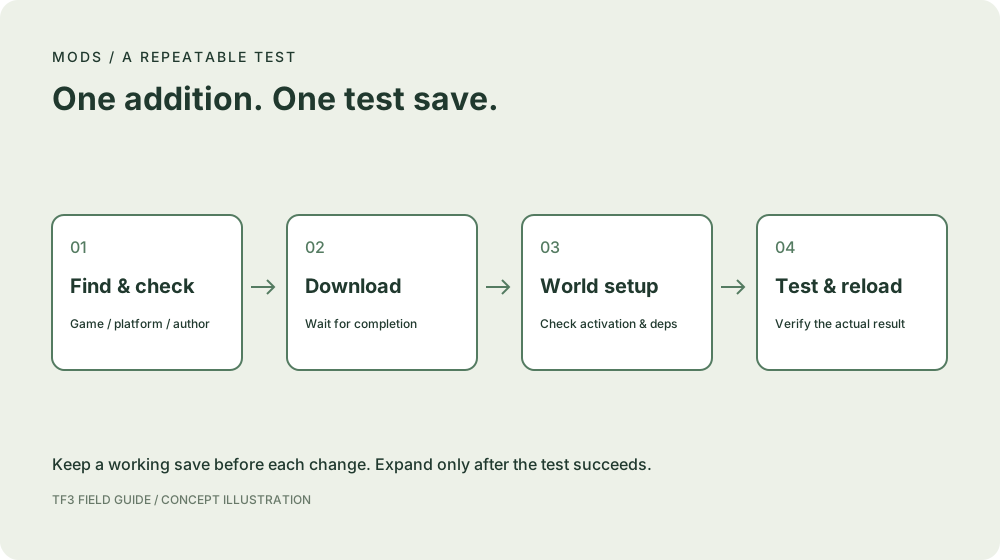
This guide takes one mod through a controlled workflow: find it, check it, download it, confirm that the intended world uses it, and test its effect. It also explains why instructions written for Transport Fever 2 can send Transport Fever 3 players to the wrong place.
01 / Use the Transport Fever 3 mod browser
The official support FAQ identifies an integrated, mod.io-based browser as the game's shared mod distribution system. It also states that Steam Workshop is not included. A Steam copy therefore does not require a separate Workshop route to obtain TF3 mods.
Start inside the game's mod browser. Read the listing before downloading: you need the author, supported game, supported platform, description, required dependencies, and any instructions for using the content. A familiar thumbnail is not evidence that a file works in your version.
Treat downloading and using a mod as two checks. The first proves that the content reached your installation. The second proves that the world you are loading actually has access to it. If your build shows separate world configuration or activation controls, follow those controls and the author's instructions. Exact button names can change; the tests below are more useful than an unverified screenshot of a menu.
02 / How to install mods: one addition at a time
- Make a separate test save. Keep a copy of the working world before changing its mod configuration. Give the test copy a clear name such as
Riverside — regional bus test. - Find a TF3 listing. Check the game identity, platform support, and author. Read the description all the way through, including limitations.
- Resolve dependencies. If the listing requires another package, install the stated version or follow the author's compatibility guidance. Do not substitute a similarly named package.
- Download through the integrated browser. Wait for completion and check the installed state. Interrupted downloads are different from gameplay conflicts.
- Check the world's mod configuration. Confirm that the addition is enabled or made available in the way your current build and the listing require. Do this before loading the test world.
- Look for the actual result. A vehicle mod should appear under its intended vehicle category and availability conditions. A map mod should be selected through the relevant map workflow. A decorative asset belongs in its stated building category.
- Run a small practical test. Place the asset or purchase one vehicle, save, exit the world, and reload. Only then introduce it into a longer-running save.
Do not edit the game's installed base files to force a downloaded mod into place. For manual installation, use the author's TF3 instructions and the current official modding documentation. This article deliberately does not invent a universal folder path across operating systems and stores.
03 / Understand compatibility before choosing a collection
The Curated Mods Program FAQ says TF2 mods are not directly compatible with TF3; authors need to adapt them. Renaming a folder or copying an old Workshop subscription does not perform that adaptation.
Curated mods receive an official review and are intended to be available across supported platforms. That is a helpful starting point, but an individual listing still matters: required packages, supported versions, and author notes decide whether an addition fits your setup. The official program also allows ordinary community releases outside the curated collection.
When a save combines several additions, compatibility is about the combination as well as each file. Two packages may target the same vehicle, station component, or script behavior. Keep a short record of which package you added, what it depends on, and what the test changed.
04 / How to choose the best mods for your network
There is no useful universal “best mods” list without a tested purpose. A beautiful locomotive is a poor addition if your map has no suitable railway, while a modest station asset may solve the layout problem you encounter every session.
| Your objective | What to look for | What to verify in a test |
|---|---|---|
| Regional vehicle variety | Correct era, category, and cargo support | The model appears and serves a suitable line |
| Better-looking stations | Modules and placement instructions | Connections and access still work after building |
| A new map | Terrain, intended scale, and setup requirements | You can build an affordable first service |
| A changed simulation | Clear explanation of the behavior being changed | A small repeatable scenario produces that behavior |
| A large visual collection | A dependency list and usable asset organization | Loading and navigating your test world remain practical |
Start with one addition that addresses your current goal. Compare before and after using the same scene or line. If you cannot describe the improvement, keep it out of the main save until you can. This is a selection method, not a claim that we have personally benchmarked a ranked collection.
05 / Transport Fever 3 mods not working: isolate the failure
First identify the stage where the process stops. A mod missing from search, a failed download, a world that refuses to load, and an asset that never appears are separate problems.
| Symptom | First checks | A useful next test |
|---|---|---|
| Listing cannot be found | Game identity, filters, platform availability | Search by author and exact title in the integrated browser |
| Download never finishes | Download status, connection, available storage | Retry the one affected package and confirm completion |
| Installed asset is missing | World configuration, era, region, category, dependencies | Open a new test world that meets the author's conditions |
| World fails to load | Missing packages, version changes, conflicting additions | Try a copy with only the new package and its required dependencies |
| Existing save breaks after an update | Changed dependencies and the author's release notes | Compare with the preserved working copy before changing more files |
For a larger collection, reduce the active test set in groups. If one half still reproduces the error, investigate that half; otherwise test the other half. Keep required dependency families together so the test does not manufacture a new missing-dependency failure.
An old vehicle being unavailable in a particular year is not automatically a mod fault. Check the vehicle-selection guide before reinstalling a package that may already be working correctly.
06 / Removing a mod from a save needs a separate plan
Disabling a downloaded package is easy to confuse with removing everything that depends on it. A save may contain vehicles, buildings, or other objects supplied by the package. Their presence can matter when that package disappears.
Read the author's removal guidance first. Work on a copy, deal with dependent objects as instructed, and check that the copy loads after the change. If the author provides no safe removal procedure, preserve the original save and investigate on a test world. A clean new world proves basic loading; it does not prove safe removal from an established network.
07 / Keep a small mod notebook
Record five things: package title and author, installed version, dependencies, test-world name, and observed result. Add the date when an update changes the behavior. This turns “my mods stopped working” into a report with a reproducible scenario.
For community discussion, describe what you expected, what actually happened, and the smallest setup that reproduces it. Link the relevant listing and avoid posting an entire collection without a test. Use the resource directory to find discussion channels, and follow the mod author's preferred support route.
A good first mod session ends with one verified addition, a preserved working save, and enough notes to repeat the test. You can expand the collection after that foundation works.