FIELD NOTES / 07 / English guide
Transport Fever 3 Cargo Not Loading? A Step-by-Step Troubleshooting Guide
Locate the first failed stage: production, pickup, unloading, storage, or onward delivery. Diagnose empty vehicles, partial unloading, and cargo carried back to the source.
Updated Oct 11, 2026 · Based on official manuals and public tutorials, with key material rechecked. Version differences are noted; not individually playtested.
On this page
When cargo is not loading, start with the first place the expected movement fails. A truck with no cargo can be the result of missing production, a wrong filter, incompatible capacity, or an unreachable source. Those require different corrections.
This diagnostic guide follows one load through the system. Make a backup, choose a representative vehicle, and change one condition at a time. Avoid rebuilding the entire chain before you have located the failed stage.
01 / Describe the symptom precisely
Pause near the problem and write what should happen next: “this truck should collect vegetables from this producer” is more useful than “freight is broken.” Record cargo type, line, stop occurrence, actual terminal, and current load.
| Observed symptom | Begin at | Next question |
|---|---|---|
| Producer has no output | Production | Are the required inputs available? |
| Output exists, vehicle stays empty | Pickup | Can the stop and vehicle collect this cargo? |
| Vehicle arrives carrying goods but leaves with them | Delivery | Was it refused, partly accepted, or reloaded? |
| Warehouse fills and never drains | Onward service | Does a compatible line actually collect it? |
| Vehicle waits indefinitely | Departure rule | What condition is it waiting to satisfy? |
If the vehicle cannot reach the stop at all, solve path access before investigating cargo filters. Transport cannot test acceptance at a location it never visits.
02 / Check available output rather than apparent activity
Open the industry window. Inspect the production rule and current input and output stocks. A factory with a high potential rate can still lack one required input. An outbound truck does not supply that missing material.
Cargo stock is held by industries and warehouses, so a visually empty platform is not reliable proof that the producer has nothing. Look at the relevant stock view instead of applying passenger-queue expectations to freight.
For processors, walk backward through each required input. If one is missing, follow its supplier and delivery segment. Repairing that earliest dependency can restore several downstream lines at once.
03 / Check five conditions when cargo will not load
Work through these checks in order:
- The source has actual output of the exact cargo.
- The selected stop can transfer that source's cargo.
- The line visits the correct compatible terminal.
- The vehicle has compatible cargo capacity and available room.
- This pickup occurrence permits loading that cargo.
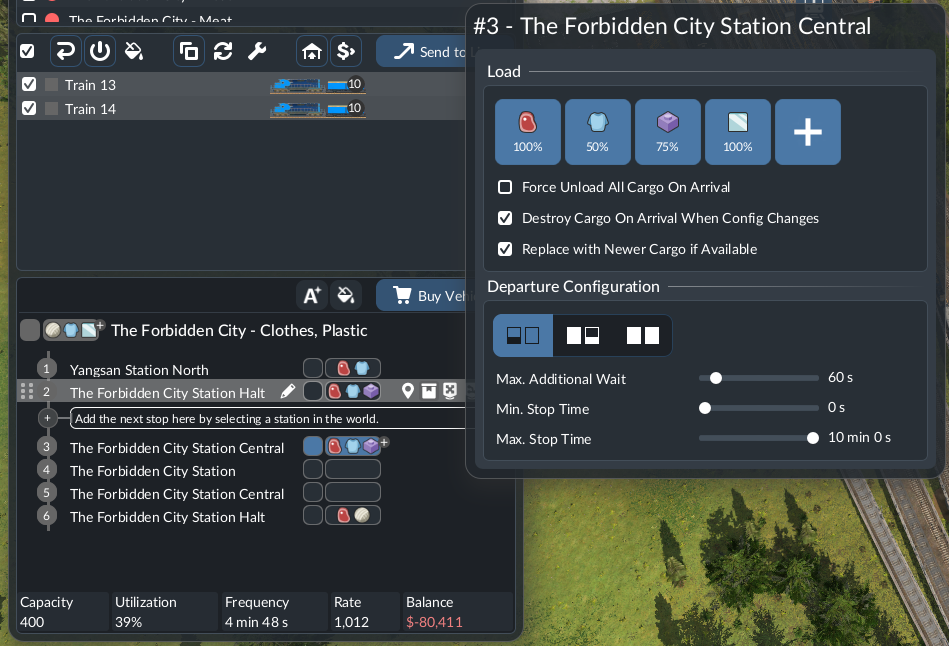
Read the vehicle store or information instead of guessing compatibility from its appearance. Inspect the stop row you are editing, especially when the route visits the same station more than once.
A compatible vehicle still needs the correct pickup configuration. Official manual image, © Urban Games.
Temporarily use straightforward available-cargo loading while diagnosing. If output exists but the truck stays empty after a visit, record the exact warnings and configuration rather than purchasing another identical truck.
04 / Separate refusal from partial delivery and reload
Watch what happens during the destination visit. A load still present afterward does not identify one cause by itself. Some cargo may have been accepted, some may have remained aboard, or compatible cargo may have been loaded again.
Inspect destination demand, free input or storage space, the actual terminal's connection, and this stop's configuration. Compare vehicle and receiver stocks before and after the visit.
For a controlled test, disable an unintended return pickup while retaining normal delivery, then run another comparable trip. If the return load disappears, you have identified reloading rather than complete delivery refusal.
05 / Distinguish a full receiver from insufficient transport
If the receiver has little available storage, only part of the arriving load may be accepted. Follow its consumption and production rather than treating every remainder as a broken truck.
A processor whose output cannot move can also become a bottleneck for further inputs. Trace both sides: required materials arriving and produced goods leaving. Extra inbound capacity can worsen a surplus if the downstream service is absent.
Reduce oversupply or restore the missing consumer stage as appropriate. The target is useful flow through the receiver, not keeping every upstream vehicle full regardless of acceptance.
06 / Diagnose a storage point with two independent tests
First verify inbound unloading into a compatible, available warehouse module. Then verify outbound pickup from the same storage point. Inspect access from both services, cargo selection, and downstream vehicle compatibility.
A warehouse beside a harbor does not prove that the truck stop reaches it. A correctly connected truck stop does not prove that its line loads the stored cargo. Follow each relationship individually.
Use warehouse transfers for a complete test. When inventory rises steadily, compare inflow with useful outflow. Enlarging storage without changing those flows merely delays the next full-stock condition.
07 / Do not mistake clearing cargo for successful delivery
Forced unloading and stock-discard controls can remove goods that a receiver does not want. That can make the returning vehicle look empty without demonstrating useful delivery or solving the underlying demand problem.
Before using such a control, identify where the cargo should go and why it is not accepted. Keep an observation of normal unloading separate from any cleanup action.
When investigating a complaint from another save, ask whether forced unloading was enabled. “It returned empty” is useful evidence only when you know how that state was produced.
08 / Use a short before-and-after operating record
Keep the same representative vehicle or equivalent service, the same cargo, and a comparable observation period. Record source output, departure load, accepted quantity, destination stock, and any return load.
A three-trip record is a practical starting exercise, not a universal statistical requirement. Its value is consistency: you can distinguish recurring failure from one isolated empty movement and see whether a single change helped.
If the chain now completes delivery but cash still falls, switch to operating costs and finance. If goods reach a warehouse but town supply remains absent, find the final delivery rather than treating storage as the consumer.