FIELD NOTES / 05 / English guide
Your First Bus Line in Transport Fever 3: From Two Stops to Real Passengers
Plan a useful passenger trip, place stops, connect a depot, assign buses, inspect boarding, and decide whether the next fix is coverage or capacity.
Updated Oct 11, 2026 · Based on official manuals and public tutorials, with key material rechecked. Version differences are noted; not individually playtested.
On this page
For a first bus line, choose a trip simple enough that you can follow it from home to destination. A two-stop route is useful because a failed journey leaves only a few places to investigate. This guide uses Hillside Homes and the town market as its example.
If you have never placed a stop, open the station construction walkthrough first. Here we concentrate on making those stops into a service people can use and evaluating what the bus actually does.
01 / Choose a passenger journey, not two convenient road edges
Pause and locate an origin containing homes and a destination offering shopping or work. Examine how the two are connected by streets and whether a bus would provide a useful journey. An origin and destination may both be covered yet still offer little reason to use this particular connection.
Make the line's purpose explicit: “Hillside Homes to the market.” Record which stops provide each end. Resist adding a third neighborhood simply because it lies nearby. It changes the travel time and return route before the original exercise is understood.
For an intercity route, compare actual travel directions toward neighboring towns. A nearby destination with difficult station access may be a worse first exercise than one with a slightly longer but straightforward usable road.
02 / Place the stops around access and travel direction
Open the road transport construction tool and Buildings, choose a passenger-capable stop, and preview it on the street beside the origin. Check conflicts, cost, and served buildings, then place it. Repeat beside the market.
Select each completed stop and review its connections. Passenger access includes the pedestrian path, so proximity alone does not settle the question. If homes cannot reach the stop, correct that before operating a larger fleet.
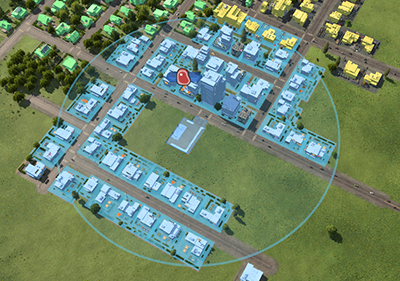
Assess each endpoint independently. Official manual image, © Urban Games.
Inspect the terminal the bus will actually use. A station containing opposite-side stops can hide a wrong-direction choice behind a shared name. A successful approach in one direction does not prove the return approach works.
03 / Connect the departure point before buying
Build a road depot on a route that reaches the stops. Trace its exit to the first service stop and follow the entire loop back. Look especially for missing road joins, one-way restrictions, and terminal entrances that require an impossible approach.
Give the depot a location-based name. Later, Buy Vehicles may select a nearby compatible depot, but compatibility alone does not prove its vehicles can reach your chosen service. Check the departure network when an otherwise valid purchase stays idle.
A passenger terminal is not a purchase depot. Treat the depot-to-line connection as its own construction requirement rather than assuming it comes with the two-stop route.
04 / Create the route and inspect its return leg
Open Line Manager, select New Line, and add Hillside Homes followed by Market Square. Inspect the route displayed on the map. With two stops the line cycles from the second stop back to the first; both legs need valid movement.
A longer list is still a cycle, not an instruction to visit every stop again on the way back. For a service intended to call at A, B, and C in both directions, configure the actual return calls and terminals rather than assuming A–B–C supplies them.
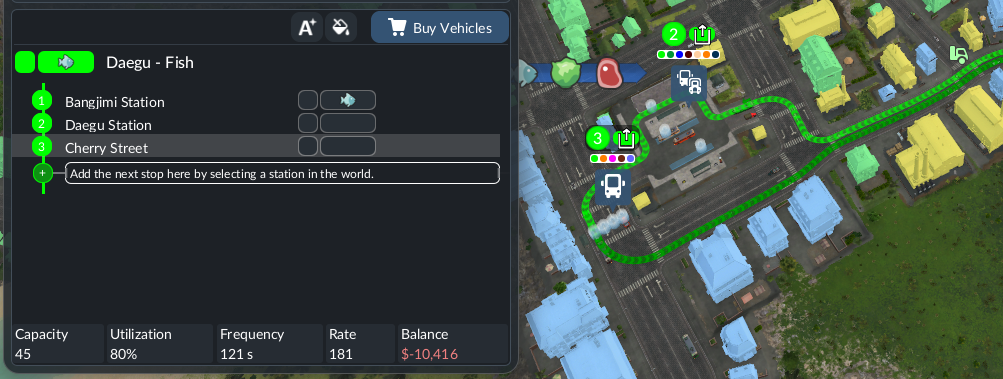
Stop order describes service; the map preview reveals how vehicles will perform it. Official manual image, © Urban Games.
If the preview takes a surprising detour, investigate road direction and access first. Adding waypoints without understanding the detour can introduce another problem while leaving the original one unresolved.
05 / Assign a trial bus and confirm its operating state
Select the line and Buy Vehicles, or purchase through the connected depot and assign the bus afterward. Choose a passenger vehicle available in your game year and review its capacity and running cost.
The initial purchase is a trial, not a final fleet plan. A vehicle with no assignment or a stopped operating state will not turn a completed route into service. Open its information and confirm line, destination, and warnings.
Use ordinary available-passenger boarding while testing. An indefinite full-load rule can make a low-demand line appear stuck and prevent you from seeing whether the destination works. After the trial, adjust vehicle count using actual service observations.
06 / Make a boarding-and-arrival record
Follow a complete cycle: depot departure, first stop, second stop, and return. Then watch several further trips. Record where passengers board, where they leave, what remains waiting, and where the vehicle spends the most time.
An illustrative note might read: “busy outbound, light return, long delay at the market junction.” That suggests investigating return use and the junction; it does not automatically justify doubling the fleet.
Separate path success from passenger success. A bus completing empty circuits shows that movement works. Useful boarding and final arrival show that the passenger connection works. Financial sustainability is the next test, explained in making money.
07 / Diagnose empty buses and passengers who will not board
Start by identifying the symptom. “Nobody waits here” and “people wait but this bus does not take them” require different checks.
| Symptom | First questions | First useful test |
|---|---|---|
| No waiting passengers | Is this a useful origin-to-destination trip? | Inspect both endpoints and an actual resident journey |
| Waiting passengers ignore the bus | Are they using this service and terminal? | Follow the relevant passenger and direction |
| Bus cannot leave or reach a stop | Is the assigned path continuous? | Inspect the depot exit and line warnings |
| Bus boards but passengers cannot finish | Is the final destination accessible? | Follow the unloading end of the journey |
| Bus is full and queues persist | Is service delayed or genuinely undersized? | Observe several departures at the bottleneck |
Do not use a single empty trip as a diagnosis. New services and uneven travel can produce isolated empty movements. Conversely, a bus repeatedly circulating without serving anyone deserves investigation before any new purchase.
Community reports sometimes describe changes to minimum stop time or rebuilding a line as save-specific workarounds. Test them only after configuration checks, from a backup, and with one change at a time. This guide does not prescribe a universal magic waiting value.
08 / Choose the next improvement by the failure stage
If a useful service is unavailable to a neighborhood, extend access or add a suitable connection. If a shared road delays every vehicle, address the delay. If vehicles operate reliably, remain well used, and leave an increasing queue, compare more frequent service with larger vehicles.
Give each experiment a predicted result: “the next three departures should reduce the queue” is something you can observe. Keep the trial condition long enough to measure the change before purchasing again.
Once the two-stop service works, develop the intercity bus network or add another useful local journey. Keep the purpose of each route clear so a future empty bus still has a manageable diagnostic path.