
FIELD NOTES / 01 / English guide
Transport Fever 3 vs 2: What Changed, and Should You Upgrade?
Compare cargo transfers, town management, fleet controls and mod requirements before choosing Transport Fever 3 or keeping your TF2 setup.
Updated Oct 11, 2026 · Based on official manuals and public tutorials, with key material rechecked. Version differences are noted; not individually playtested.
On this page
The Transport Fever 3 vs 2 decision is mainly about the logistics and management you want to play. Consider TF3 if you want to learn its cargo-transfer systems and management tasks. Keeping TF2 is reasonable if your existing world still satisfies you, especially when particular mods are essential to it.
This guide uses official information checked on October 13, 2026. It is a buying framework, not a matched-hardware gameplay review. TF3 launched on September 29, 2026; descriptions that still treat it as an unreleased game need updating. Official launch announcement.
01 / Match the upgrade to your play style
| Your priority | Our recommendation | Check first |
|---|---|---|
| A first transport game | Watch current TF3 gameplay before choosing | Whether planning and repeatedly adjusting routes appeals to you |
| Cargo networks and transfers | Look closely at TF3 warehouses | Whether you want to learn its transfer rules |
| Town development and management | Review the expanded management systems | Whether the extra tasks suit your preferred play style |
| Specific TF2 mods | Check corresponding TF3 releases before switching | Author support, dependencies and available replacements |
| Occasional play in a satisfying TF2 save | Keep playing or wait for a better buying opportunity | Whether the new systems solve a need you actually have |
These are editorial judgments. More features do not make upgrading mandatory.
02 / Cargo transfers deserve a fresh look
The TF3 warehouse manual distinguishes intermediate storage from final delivery. Warehouses support cargo transfers between transport modes; factories and town buildings do not directly use their inventories. You still need onward transport. Official warehouse manual.
For a planning example, consider a ship handing cargo to trucks. Check arrival into storage, collection by the next line and delivery to the recipient separately. This is a diagnostic method, not a claim that we tested a particular save.
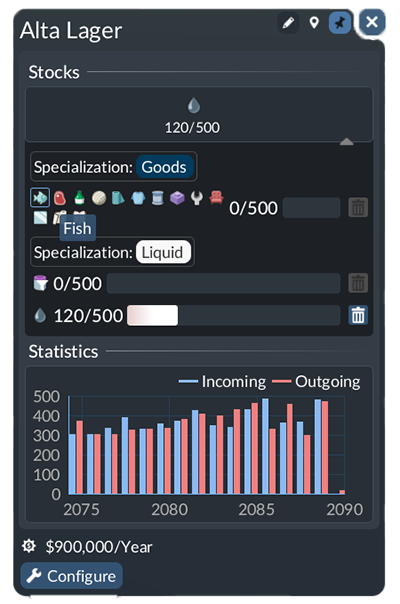
Official manual example, © Urban Games. Inventory helps distinguish transfer from final delivery.
Use our warehouse and transfer walkthrough for the process, or the cargo troubleshooting checklist when goods stop moving. Change one part at a time so that you can identify what restored the flow.
03 / TF2 already simulated towns
TF2 already gave residents homes, jobs and shopping destinations. Its manual links town growth to accessibility, supply and service quality. Calling TF2 a game without town simulation would misrepresent the comparison. TF2 town manual.
TF3's official overview emphasizes citizen happiness, municipal areas and the connection between town development and company progression. That is a more useful reason to investigate upgrading than a claim that cities only started to matter in TF3. Official tycoon overview.
Ask whether you enjoy managing those interactions. A player focused on railway scenery may value a different set of improvements.
04 / Review line controls and maintenance
The TF3 manual documents an integrated view of lines, vehicles and stops, including stop reordering, terminal selection, loading settings and connection warnings. Use gameplay footage to judge whether your recurring tasks feel easier. A feature description alone cannot establish usability. Lines and vehicles manual.
The official overview also describes automatic maintenance within suitable facilities' range, with neglected fleets becoming slower, noisier and more polluting. Maintenance overview.
Our vehicle comparison tool and ownership-cost calculator help organize your own assumptions. Their outputs depend on your inputs; they are not official vehicle rankings.
05 / Check mods separately from graphics
TF3's official preview describes cross-platform mod support. That does not establish compatibility for a particular TF2 mod or predict how large either game's future catalog will be. Official feature preview.
List the vehicles, maps, assets and scripts you depend on, then check each author's corresponding release. Start with our mod directory and compatibility guide. Installation success alone is not evidence that every feature works.
Screenshots show appearance, not frame rates. Compare performance reports only when they identify hardware, resolution and world complexity. We have not benchmarked the two games on matching hardware, so this guide makes no FPS promise.
06 / Check prices, reviews and requirements
The launch announcement lists PC recommended prices of $49.99 for Standard and $64.99 for Deluxe. Regional prices, promotions and console prices differ; use your storefront's checkout price. Edition pricing.
Our October 13 Steam snapshot showed 2,640 English reviews with 72% positive feedback. That is a language-specific snapshot, not a permanent all-language score. The store also lists single-player and Simplified and Traditional Chinese interface/subtitle support. Steam store.
Before buying, read recent review text, compare your machine with current requirements and check which edition extras you actually want. Do not assume a Deluxe purchase resolves base-game bugs or that a TF2 save or mod will carry over.
07 / Start with one observable route
After choosing TF3, start with our first-hour guide, first cargo line or railway signal guide. Record what you changed, how loading or passenger use changed, and what happened to costs. A small route you understand is a better foundation than simultaneous expansion across systems you have not yet checked.